


Direct download
Uses Fancy Little Software activation and the configured in-app updater. Installer availability and requirements are checked from the maintained release catalogue.
Check StreamLatch purchase optionsStreamLatch · Live stream discovery and recording for Mac
Discover public Twitch and Kick streams, then watch, save, monitor, or record supported broadcasts you have permission to keep.
A little more memorable
Browse public live listings without a StreamLatch or provider customer login. Watching opens the provider page. Saving builds your private creator list. Recording uses the native local recorder, its permission checks, and storage you choose.
Live discovery. Local recording.
Public metadata helps you find a broadcast. It does not grant recording access, change your local creator policies, or send your private library to the discovery service.
| Provider | Public discovery | Save / monitor | Recording | Important limit |
|---|---|---|---|---|
| Twitch | Available public listings | Supported locally | Beta path | Loaded pages are a bounded popularity sample; each source is revalidated. |
| Kick | Available bounded v2 sample | Supported locally | Beta path | Not advertised as a global viewer-ranked directory. |
| TikTok LIVE | Not in this public discovery view | Existing creator workflow | Supported path | May require a connected browser session; access varies by broadcast. |
The discovery request contains no local recording titles, paths, footage, watchlists, purchase details, browser profiles, or provider credentials. Read the privacy notice · Record responsibly
Inside StreamLatch
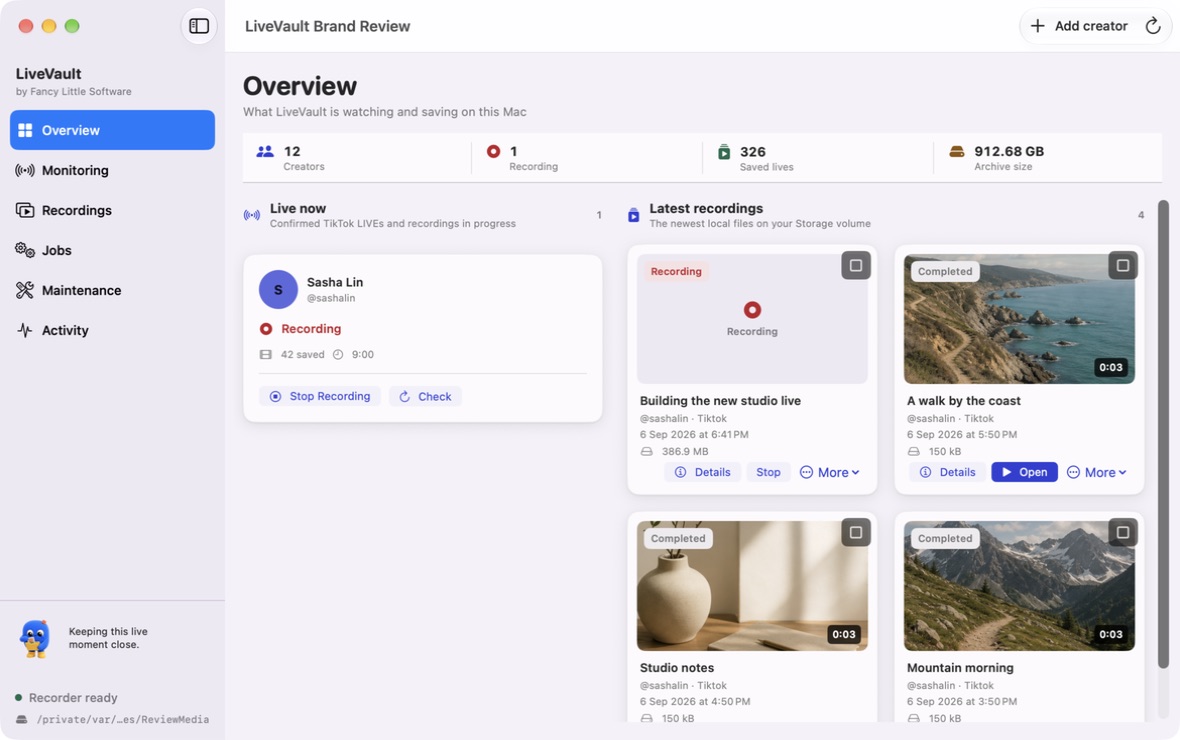
The native app keeps public listings, creator choices, local capture state, and the saved library distinct. The current private review capture uses controlled fixture state and is not a public-release claim.
Private native review build · Controlled fixture · Availability and release status remain governed by the release-options page.
A little hands-on moment
Follow a fictional live moment from monitoring to automatic recording, then into a collection. You control the example; no real broadcast is recorded.
Monitoring is enabled in this simulation. No account or real broadcast is connected.
US$4.99billed monthly
US$49billed yearly
About US$4.08/month. Save US$10.88 (18%) compared with twelve monthly payments.
Same paid features on either plan. Check current availability before paying.
Review availability and the full purchase terms before continuing to PayPal.
Check StreamLatch purchase optionsOur 7-day voluntary refund policy preserves statutory rights. Refunds · Licence · Terms
Keep the files. Choose the home.
Browse current public Twitch and Kick listings, then filter by provider, category, language, creator, or title. Unknown or restricted content previews stay hidden.
Watch opens the canonical provider page. Save does not enable recurring recording. Monitor and Notify are explicit ongoing choices.
For supported accessible streams, Record rechecks the current broadcast, permission, storage, entitlement, capacity, and source access before capture starts.
Distinguish a public live observation, recording availability, an active local capture, and an interruption. Seeing “live” does not guarantee desktop access.
Browse by creator, search recording details and add notes or bookmarks to make longer recordings easier to return to.
If a recording is interrupted, inspect the saved portion and activity details. Recovery tools help you decide what to retry without discarding useful material.
Keep recordings as files on the storage you choose. Back up your media and catalogue together, and leave room for temporary processing.
Connections, with context
Public discovery currently covers Twitch and Kick. Recording support is separate: Twitch and Kick are beta recording paths, TikTok LIVE remains supported, and source access can vary by broadcast, account session, provider, and release channel. No platform affiliation or universal recording guarantee is implied.
A creator can be publicly listed while recording remains unavailable to the local recorder. StreamLatch rechecks the exact source and does not override provider restrictions.
Connection troubleshooting
Here’s to your next favourite thing.
Your next little chapter starts here.
Read the StreamLatch guideThree little discoveries. Explore at your own pace.
Two apps. Two different ways to keep.
A hands-on taste, right here in your browser.
From your first step to your next collection.
Try the browser demos, compare prices, or check the latest release availability.